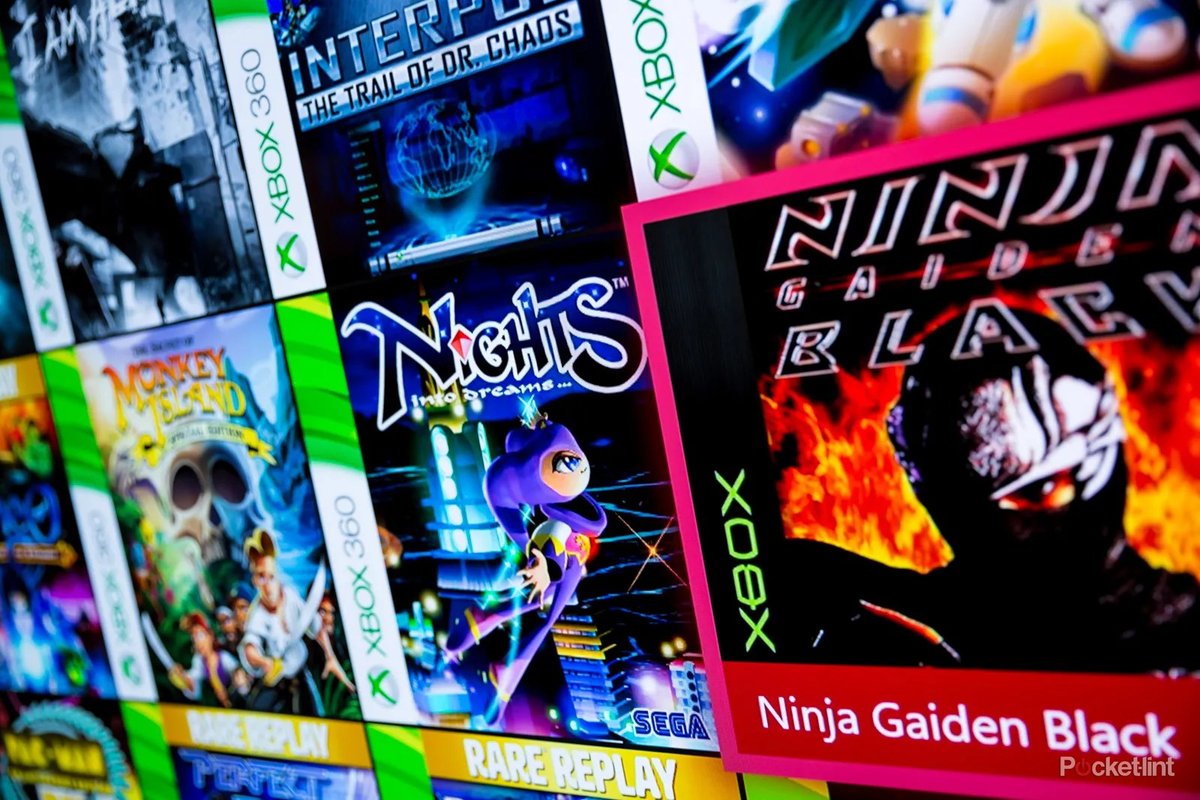
Imagine a gaming world where the games you love never truly fade away, where your cherished memories from decades past can be revisited on the latest hardware, and where the lines between generations blur into one seamless experience. This isn't just a gamer's pipe dream; it's the reality Xbox has been meticulously building, and it's how Games, Ecosystem & Backward Compatibility is fundamentally redefining its future. It's about more than just playing old games; it's about preserving gaming history, respecting player investment, and creating a unified platform that truly puts you, the player, at its center.
At a Glance: Why Xbox Backward Compatibility Matters
- Plays Thousands of Games: Access Original Xbox, Xbox 360, and Xbox One titles on Xbox One, Series X, and Series S.
- No Extra Cost: Your owned games are ready to play.
- Performance Boosts: Enjoy enhancements like FPS Boost, Auto HDR, and higher resolutions on newer consoles.
- Saves & Achievements Transfer: Mostly, your progress moves with you (with specific notes for Original Xbox).
- Future-Proofing: Xbox is actively developing the "next evolution" of compatibility, aiming for even broader support, including PC and cloud.
- Unified Ecosystem: Part of a larger strategy to make gaming more accessible and platform-agnostic.
More Than Just Old Games: The Philosophy Behind Xbox's Approach
For many years, buying a new console meant saying goodbye to your old game library. It was an expensive, frustrating cycle that forced tough choices and fractured gaming communities. Xbox saw this not as an inevitability, but as a problem to solve. Their commitment to backward compatibility isn't just a feature; it's a foundational pillar of their entire gaming strategy, a testament to respecting the investment you've made over years, if not decades. It’s a philosophy that champions preservation and accessibility.
Your Existing Library, Reinvigorated: How Backward Compatibility Works Today
The current iteration of Xbox Backward Compatibility is nothing short of impressive, allowing you to dive back into thousands of games across three generations of consoles. Whether you're dusting off a classic or discovering a gem you missed, the process is designed to be incredibly straightforward.
Getting Started with Your Old Favorites
You're probably wondering how easy it actually is to start playing your old games. Good news: it’s incredibly simple.
- Digital Downloads: If you own a digital version of an Original Xbox, Xbox 360, or Xbox One title, it will automatically appear in the "Ready to Install" section of your game library on your Xbox One, Xbox Series X, or Xbox Series S. No fuss, no searching.
- Disc-Based Games: For physical game discs, simply insert the disc into your Xbox One or Xbox Series X console. The game will install, and you’ll need the disc in the drive to play it, just like its original console. Remember, the Xbox Series S is a digital-only console, so disc-based games are not supported there.
Microsoft didn't just flip a switch and make these games playable. They dedicated over 500,000 hours of rigorous testing to ensure that games on Xbox Series X|S meet high quality standards, ensuring a smooth and enjoyable experience for you.
Beyond Just Playing: The Performance Boosts
Backward compatibility on Xbox isn't just about functionality; it's about enhancement. Many older titles don't just run; they run better than ever before on your new hardware.
- FPS Boost: This phenomenal feature can nearly double the original framerates of many classic titles, providing a smoother, more responsive gaming experience. Imagine playing your favorite Xbox 360 action game at 60fps or even 120fps!
- Higher Resolutions: Select games can now render at higher resolutions, often up to 4K, bringing crisper visuals to titles you thought you knew inside and out.
- Auto HDR: Even if an older game wasn't built with High Dynamic Range in mind, Auto HDR automatically steps in to improve SDR (Standard Dynamic Range) games. This means richer colors, more nuanced lighting, and a broader range of brightness, making old worlds feel new again.
These enhancements are automatically applied where available, meaning you often don't have to lift a finger to enjoy a superior experience.
Your Progress, Your Way: Saves, Add-ons, and Achievements
One of the biggest concerns for any gamer revisiting old titles is losing their progress. Xbox has largely solved this.
- Seamless Transfers: For most Xbox 360 and Xbox One titles, your game saves, add-ons (like DLC and expansions), and hard-earned achievements generally transfer seamlessly to your newer console. Log in, and pick up right where you left off.
- Original Xbox Nuances: There are a couple of specifics for Original Xbox titles. While new game saves created on an Xbox One or Xbox Series X|S can transfer via the cloud, initial game saves from your original console generally do not transfer over. Also, achievements were not a feature of the Original Xbox generation, so they are not available for those titles.
Keeping the Party Going: Multiplayer and System Link
While some older online services have been retired, the spirit of multiplayer lives on for many backward compatible games.
- Offline Fun: If an Original Xbox or Xbox 360 game supported offline multiplayer, co-op, or party play, those features are maintained and fully functional on newer consoles.
- System Link Across Generations: In a truly impressive feat, system-link functionality for Original Xbox games works across all Xbox console generations. That means you could theoretically have an Original Xbox, an Xbox 360, an Xbox One, and an Xbox Series X|S all linked up for a classic LAN party!
- Online Limitations for Original Xbox: It's important to note that original Xbox Live services, such as online multiplayer and in-game marketplaces, are not supported for Original Xbox games. For these titles, it’s all about local play.
The Xbox Ecosystem: A Unified Experience
Backward compatibility doesn't exist in a vacuum; it's a vital part of the larger Xbox ecosystem, which aims to provide a consistent, high-quality gaming experience no matter where or how you play. This holistic approach is why features like backward compatibility feel so natural within the Xbox environment.
Think about how all the pieces fit together: your game library, your friends list, your saves, your achievements – they all reside in a single, interconnected ecosystem. This means whether you're playing a brand new Series X game or an Original Xbox classic, your experience is consistent. It's also why services like the full benefits of Xbox Game Pass Ultimate feel so compelling, offering a vast library that often includes backward-compatible titles, allowing you to discover or revisit games with ease.
Looking Ahead: The "Next Evolution" of Backward Compatibility
Microsoft isn't content to rest on its laurels. The commitment to preserving gaming's past and unifying its future is an ongoing project. Recent reports and job listings paint a clear picture of what's to come, promising a future where your game library is even more robust and accessible.
Future-Proofing Your Library
A May 2025 job listing from Microsoft hinted at a "next evolution" of Xbox game backward compatibility, suggesting that the current impressive system is just the beginning. This isn't just about old games; it's about ensuring all games, current and future, remain playable. In April 2024, an Xbox team was specifically formed with the explicit goal of "future-proofing game libraries." While their primary focus is current games, this initiative will undoubtedly support older titles as well.
This effort aligns perfectly with Microsoft's broader "This is an Xbox" campaign, launched in 2024. The campaign promotes a vision of platform-agnostic gaming, where "Xbox" isn't just a box under your TV, but a pervasive, flexible gaming experience that travels with you. To truly embody this vision, unfettered access to your entire game catalog, regardless of generation or device, is paramount.
Expanding Horizons: PC and Cloud Integration
The future of backward compatibility at Xbox looks set to extend beyond just consoles, embracing the PC and the cloud as integral components of the gaming ecosystem.
- PC Support: A March 2025 report speculated on the possibility of a unified SDK (Software Development Kit) if the rumored Xbox Series X/S successor console adopts a PC-based architecture. This could pave the way for significantly enhanced PC support for backward-compatible titles, blurring the lines between console and PC gaming even further. Imagine playing an Original Xbox classic directly on your PC with modern performance boosts! This focus on cross-platform accessibility is key to allowing you to explore the power of cloud gaming from virtually any device.
- Cloud Streaming with Emulation: Building on the November 2024 expansion of Xbox Cloud Gaming to stream owned games, future backward compatibility efforts are expected to incorporate robust cloud support. Emulation is a likely component to enhance this feature, allowing even more complex or older titles to be streamed effortlessly. This means your entire game library, from ancient to cutting-edge, could be available on demand, anywhere you have an internet connection.
This "next evolution" signifies a strategic shift, ensuring that the "Xbox" brand truly represents an interconnected web of gaming experiences, not confined by hardware generations or even device types.
Navigating the Backward Compatible World: Practical Tips & FAQs
How do I know if a game is backward compatible?
Xbox maintains an official list of all backward compatible titles on their website. Many games in the Xbox digital store will also indicate if they are playable on multiple generations.
Are there any specific games that won't work?
While thousands of games are supported, not every single game from past generations is backward compatible. This can be due to licensing issues, technical complexities, or other factors. Always check the official list if you're unsure about a specific title.
Can I play my digital Xbox 360 games on my Xbox Series S?
Absolutely! Since the Xbox Series S is a digital-only console, any digital games you own from the Original Xbox, Xbox 360, or Xbox One generations will automatically appear in your "Ready to Install" section.
What about accessories? Do my old controllers work?
Generally, only current-generation Xbox controllers (Xbox One, Xbox Series X|S) and officially licensed peripherals are compatible with Xbox Series X|S consoles. You can, however, customize your Xbox controller to make your modern setup feel more personal. While your old Xbox 360 controllers won't plug into a Series X, the modern ones offer superior comfort and features, which you can further optimize when you enhance your setup with the best Xbox Series X accessories.
My Original Xbox game save didn't transfer. What gives?
As mentioned, initial game saves from the original Xbox console often don't transfer. However, any new saves you create while playing that Original Xbox game on an Xbox One or Series X|S will be cloud-saved and accessible across those newer consoles.
Can I still find classic games to buy digitally?
Yes! Many backward-compatible titles, especially those from the Xbox 360 era, are available for digital purchase in the Xbox store. This allows new players to experience classics without needing to hunt down physical discs.
The Enduring Impact: A Legacy Preserved, A Future Unlocked
The meticulous work behind Xbox's Games, Ecosystem & Backward Compatibility is more than just a convenience; it's a profound statement about the value of gaming history and the unwavering importance of player choice. By ensuring that classic titles not only survive but thrive on modern hardware, Xbox is building a gaming platform that transcends generations. It’s a holistic approach that promises a future where your gaming journey is continuous, your investments are honored, and the sheer joy of play is never artificially limited by hardware cycles.
As Xbox continues to push the boundaries of compatibility, integrating PC and cloud technologies, the vision of a truly unified, platform-agnostic gaming experience comes into sharper focus. This isn't just about playing old games; it's about shaping a gaming future where every game has a home, and every player has access to a limitless library. To truly appreciate where Xbox is heading, it's worth taking a moment to Explore the next generation Xbox and understand how these foundational principles are driving its evolution. It's an exciting time to be an Xbox gamer, knowing that your past, present, and future in gaming are more connected than ever before.